Validate the Installation
Confirm two things: the agent installed correctly, and it is actively intercepting traffic. Each platform has five sequential checks — a failed check halts progression until you resolve it.
Console-side validation — the fastest check
If the agent successfully phoned home, the device shows up in the Quilr Console within seconds. Open Settings → Endpoint in your tenant Console and switch to the Deployment Status tab. Type the device’s hostname or the user’s email in the search box.
| Column | Healthy value | If it’s wrong … |
|---|---|---|
| Device | Hostname matches the machine you installed on, with a UUID below | Missing → agent never reached discover.quilrai.dev. Check the Step 6 allow-list & AV exclusion. |
| Email Address | The signed-in user’s email | Empty → email-discovery hasn’t resolved a persona; sign the user into the Quilr Console once. |
| Full Name | Resolved from the IdP | Empty → same as Email; persona unresolved. |
| OS | Detected platform (e.g. Windows 11 Pro / Mac OS X:26_5_1) | Wrong build → the agent reported a different OS than expected; usually just stale telemetry, rerun after a reboot. |
| Status | Enabled | Disabled → the agent service is stopped. Restart it (Windows: Start-Service QuilrAIAgent, macOS: sudo launchctl kickstart system/ai.quilr.sentinel). |
| Version | Matches “Latest Endpoint Version” banner top-right | Stale → redeploy or wait for the next auto-update. |
| Installed On | Today’s date | Older → the new install didn’t register a new device row; reinstall didn’t replace the prior install. |
| Last Seen | “a few minutes ago” / “just now” | > 1 hour → agent process stopped or device offline. Tail agent.log for the last heartbeat error. |
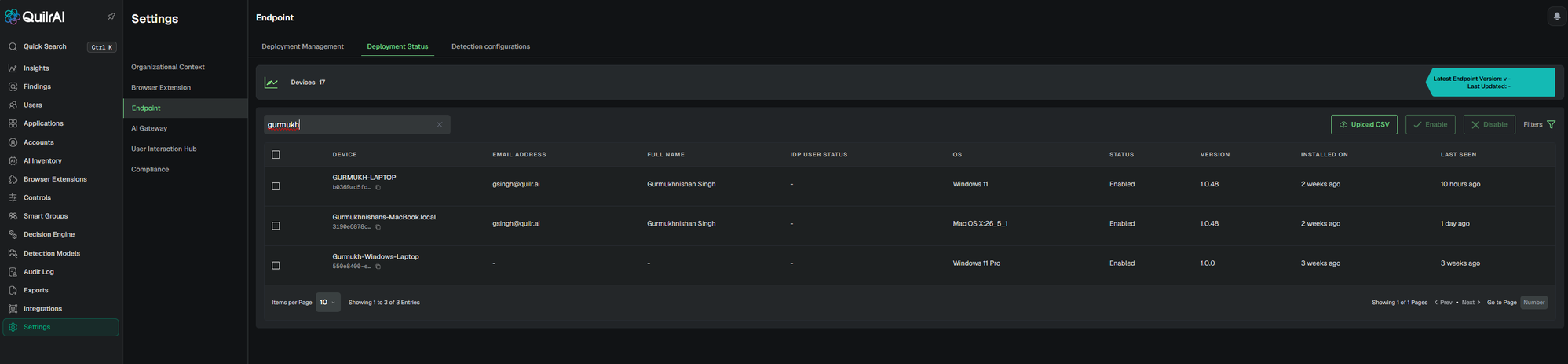
Enabled, current version, and a fresh Last Seen.
Run all commands in Terminal with sudo rights.
Binaries installed
ls -ld /Applications/QuilrAIProxy.app && \
ls -ld "/Library/Application Support/QuilrAI" && \
defaults read /Applications/QuilrAIProxy.app/Contents/Info.plist CFBundleShortVersionString2026.05.08).If this check fails — inspect the pkg install log:
| Log | Path |
|---|---|
| Quilr installer trace | /Library/Application Support/Sentinel/logs/sentinel-endpoint.log |
| macOS installer subsystem | /var/log/install.log (filter with grep -i quilr) |
sudo tail -n 200 /Library/Application\ Support/Sentinel/logs/sentinel-endpoint.log 2>/dev/null
sudo grep -i 'quilr\|sentinel' /var/log/install.log | tail -n 100
Most pkg failures are codesign / notarization mismatches or insufficient disk space.
Daemons running
pgrep -lf 'quilrai|quilrai-proxy'
sudo launchctl print system/ai.quilr.sentinel       | grep -E 'state =|last exit'
sudo launchctl print system/ai.quilr.quilrai-proxy | grep -E 'state =|last exit'state = running on both daemons; last exit code = 0.CA chain in System keychain
COUNT=$(security find-certificate -a /Library/Keychains/System.keychain | grep -ci quilr)
echo "Quilr certs in System keychain: $COUNT (expect: 2)"2 (root + intermediate).Network Extension activated
systemextensionsctl list | grep -i quilr[activated enabled] — not waiting or absent.Full Disk Access granted via MDM
sudo sqlite3 "/Library/Application Support/com.apple.TCC/TCC.db" \
"select client, allowed, auth_reason from access \
where service='kTCCServiceSystemPolicyAllFiles' and client like '%quilr%';"allowed=1 and auth_reason=4 (MDM grant).Run all commands in PowerShell as Administrator.
MSI installed
Get-ChildItem `
  HKLM:\SOFTWARE\Microsoft\Windows\CurrentVersion\Uninstall\*, `
  HKLM:\SOFTWARE\WOW6432Node\Microsoft\Windows\CurrentVersion\Uninstall\* |
Get-ItemProperty | Where-Object DisplayName -like '*Quilr*' |
Select-Object DisplayName, DisplayVersion, Publisher, InstallDate

Get-Item "$env:ProgramFiles\QuilrAI" | Select-Object FullName, LastWriteTimePublisher = Quilr AI; the install folder exists.If this check fails — inspect the MSI install log:
| When the MSI was run by | Log path |
|---|---|
| Signed-in user (interactive install) | C:\Users\<USER>\AppData\Local\Temp\sentinel-msi-install.log |
SYSTEM (MDM-pushed — Intune Win32 / ManageEngine / GPO) | C:\Windows\Temp\sentinel-msi-install.log |
Probe both locations from a shell and tail whichever exists:
foreach ($p in @(
  "$env:TEMP\sentinel-msi-install.log",
  "C:\Windows\Temp\sentinel-msi-install.log",
  "C:\Users\$env:USERNAME\AppData\Local\Temp\sentinel-msi-install.log"
)) {
  if (Test-Path $p) { "==> $p"; Get-Content $p -Tail 200; break }
}
For the rollback equivalent, replace sentinel-msi-install.log with sentinel-msi-uninstall.log.
Windows service running
Get-Service | Where-Object { $_.Name -match 'quilrai|quilr' } |
Select-Object Name, Status, StartTypeStatus = Running and StartType = Automatic.WinDivert driver registered
sc query WinDivertSERVICE_NAME: WinDivert · STATE : 4 RUNNING. "The specified service does not exist as an installed service" = MSI did not register the driver — see Step 6 § Known issues.CA chain in Local Machine trust store
certutil -store Root | Select-String -Pattern 'Quilr' -SimpleMatch
certutil -store CA | Select-String -Pattern 'Quilr' -SimpleMatchRoot store and Quilr intermediate in the CA (Intermediate) store.Critical log locations (Windows)
If any of the four checks above fails, the relevant log is here. Tail the matching file and search for ERROR / FATAL / the MSI return code first.
| Component | Path | Purpose |
|---|---|---|
| Agent runtime (all services) | %PROGRAMDATA%\quilrai\logs\ | Root directory for every sentinel-service trace (proxy, templating engine, broker) |
| Proxy daemon (runtime) | %PROGRAMDATA%\quilrai\logs\proxy.log.YYYY-MM-DD | DLP engine, TLS interception, flow.matched events — daily-rotating |
| Templating engine (runtime) | %PROGRAMDATA%\quilrai\logs\templating-engine.log.YYYY-MM-DD | DLP alert popups — daily-rotating |
| IPC broker (runtime) | %PROGRAMDATA%\quilrai\logs\agent.stderr.log (also agent.stdout.log) | Lifecycle, init, heartbeat, inter-process broker traffic |
| MSI install — interactive (signed-in user) | %TEMP%\sentinel-msi-install.log | MSI verbose trace when the user double-clicked / msiexec'd |
| MSI install — SYSTEM (MDM-pushed) | C:\Windows\Temp\sentinel-msi-install.log | Same trace when Intune Win32 / ManageEngine / GPO ran the MSI as LocalSystem |
| MSI uninstall / rollback | %TEMP%\sentinel-msi-uninstall.log or C:\Windows\Temp\sentinel-msi-uninstall.log | Rollback / uninstall verbose trace |
| Intune Management Extension | %PROGRAMDATA%\Microsoft\IntuneManagementExtension\Logs\IntuneManagementExtension.log | Win32 download · hash check · install orchestration (Intune-only) |
| Windows Event Log — System | Get-WinEvent -LogName System | ? { $_.ProviderName -match 'WinDivert' } | Select -First 50 | WinDivert kernel-driver load / registration failures (elevated) |
| Windows Event Log — Application | Get-WinEvent -LogName Application | ? { $_.ProviderName -match 'Quilr' } | Select -First 50 | User-mode service crashes · uncaught exceptions surfaced to WER |
Templating-engine / broker filenames mirror the macOS layout; if a file is missing on a given build, confirm the exact name with Quilr support before escalating.
Install folder layout (Windows)
Reference tree of what a healthy install puts on disk. Use to spot missing binaries (failed MSI custom action) or rogue extras (tampering).
%ProgramFiles%\QuilrAI\ — install root
C:.
│   bootstrap.exe
│   cert.pem
│   dlp_content_extractor.json
│   email-discovery.exe
│   h2_disable_hosts.txt
│   ipc-light-broker.exe
│   key.pem
│   quilrai-diagnostics.exe
│   quilrai-endpoint.exe
│   quilrai-monitor-v2.exe
│   quilrai-proxy.exe
│   quilrai.exe
│   root.pem
│   template-engine.exe
│   templating-engine.exe
│   WinDivert.dll
│   WinDivert.lib
│   WinDivert64.sys
│
├───configs
│       oauth_config.json
│       redirector_config.toml
│
├───hooks
│   │   quilrai-claude-hook-client.exe
│   │   quilrai-codex-hook-client.exe
│   │   quilrai-copilotcli-hook-client.exe
│   │   quilrai-hook-client.exe
│   │
│   └───scripts
│       │   claude_code.lua
│       │   codex.lua
│       │   copilot.lua
│       │   cursor.lua
│       │   kiro.lua
│       │   lmstudio.lua
│       │   manifest.json
│       │   nemoclaw.lua
│       │   ollama.lua
│       │
│       └───lib
│               frontmatter.lua
│               mcp.lua
│               path.lua
│               risk.lua
│
├───icons
│       icon.ico
│       icon.png
│
├───installer
│       brand.json
│       certs-bundle.zip
│       install-launcher.exe
│       quilrai-tray.exe
│       uninstall-launcher.exe
│       update-launcher.exe
│       vc_redist.x64.exe
│
└───templates
    │   alert.html
    │   block.html
    │   index.html
    │   notification.html
    │   prompt.html
    │
    └───app-discovery
            alert.html
            block.html
            notification.html
Reproduce with: tree /F /A "%ProgramFiles%\QuilrAI"
%HOMEPATH%\.quilrai\ — per-user hooks · scripts · state
C:.
│   quilrai-claude-hook-client.exe
│   quilrai-codex-hook-client.exe
│   quilrai-copilotcli-hook-client.exe
│   quilrai-hook-client.exe
│
├───logs
│       monitor.log.2026-06-14
│
├───scripts
│   │   claude_code.lua
│   │   codex.lua
│   │   copilot.lua
│   │   cursor.lua
│   │   kiro.lua
│   │   lmstudio.lua
│   │   manifest.json
│   │   nemoclaw.lua
│   │   ollama.lua
│   │
│   └───lib
│           frontmatter.lua
│           mcp.lua
│           path.lua
│           risk.lua
│
└───v2
        snapshot.json
        tenant-policy.json
Reproduce with: tree /F /A "%HOMEPATH%\.quilrai" · monitor.log.YYYY-MM-DD is the per-user agent-monitor trace (daily-rotating). The v2\ folder caches the tenant policy snapshot.
Functional test — claude.ai interception
This proves the agent is actively decrypting and matching AI traffic in real time.
sudo log stream --predicate 'subsystem == "ai.quilr.endpoint"' --info \
| grep -iE 'matched|intercepted|claude'
Then open https://claude.ai in Safari or Firefox and send a prompt.
flow.matched … claude.ai line appears within ~2 seconds; no certificate warning; Claude responds normally.Get-Content "$env:PROGRAMDATA\quilrai\logs\proxy.log.*" -Tail 0 -Wait |
Select-String -Pattern 'matched|claude' -SimpleMatchOpen https://claude.ai in Firefox and send a prompt.
matched … claude.ai line in the log within ~2 seconds.Certificate-chain verification
Confirm the TLS issuer is rewritten to Quilr’s CA — the definitive proof of interception.
openssl s_client -connect claude.ai:443 -servername claude.ai </dev/null 2>/dev/null \
| openssl x509 -noout -issuer$tcp = New-Object Net.Sockets.TcpClient('claude.ai', 443)
$ssl = New-Object Net.Security.SslStream($tcp.GetStream())
$ssl.AuthenticateAsClient('claude.ai')
$ssl.RemoteCertificate.IssuerBrowser padlock check
- Chrome / Edge: padlock → Connection is secure → Certificate is valid → Details
- Safari: padlock → Show Certificate
- Firefox: padlock → arrow → More information → View Certificate
Leaf certificate Issued By = Quilr CA confirms active interception. If it shows Anthropic’s real CA, the agent is not intercepting that browser’s flow.
Desktop-app DLP test — verify the agent intercepts native AI apps
The proxy + WinDivert / Network Extension stack should intercept TLS traffic from both browsers and native desktop AI apps (Claude Desktop, ChatGPT Desktop, Cursor, GitHub Copilot, …). This test confirms the desktop side with a synthetic-PII payload and the Quilr Security Alert popup.
1 — Confirm Guardrails are ON for the target apps
Open Settings → Endpoint → Detection configurations in the Quilr Console. The header should read “X/X active” (all detection configs enabled). For every app row you intend to test, confirm each category (Chat / File Upload / Codex / …) shows the green GUARDRAILS ON pill.
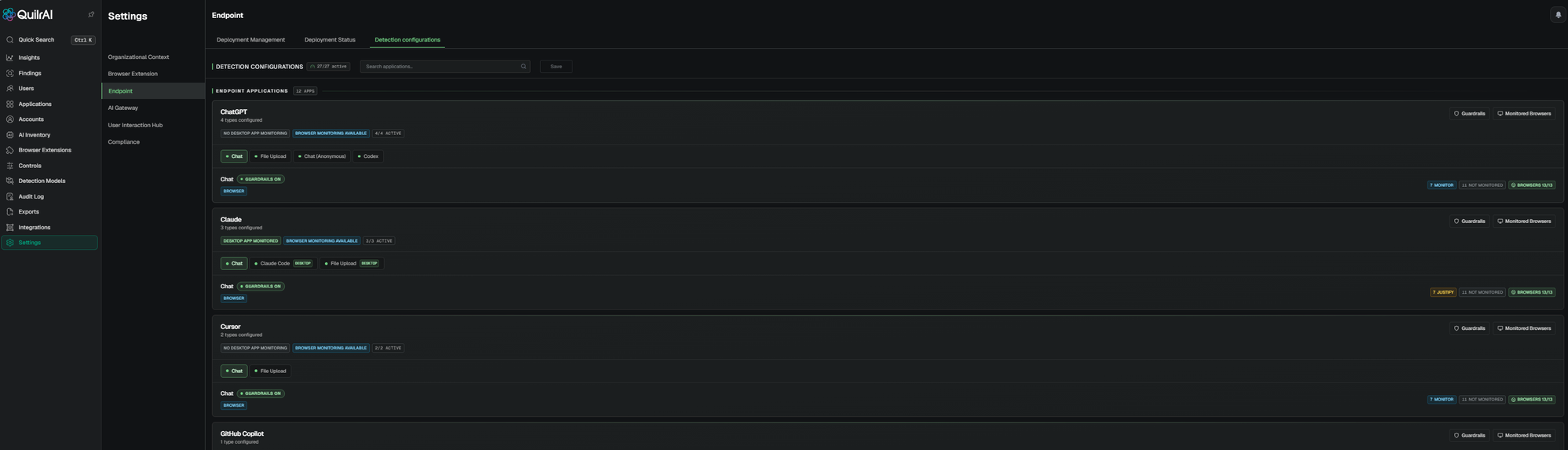
| Pill / column | What it means for this test |
|---|---|
DESKTOP APP MONITORED | The agent will hook the native app’s TLS traffic. Required for desktop-app testing — if absent, the agent only sees browser traffic. |
BROWSER MONITORING AVAILABLE | The Browser Extension can monitor this app in a browser tab. Not required for the desktop-app test. |
GUARDRAILS ON (green) | DLP runs against this category. GUARDRAILS OFF → agent sees the traffic but never raises a popup. |
X/X ACTIVE | Every detection type is enabled. 2/4 active → only 2 of 4 categories on; check which is off. |
2 — Submit synthetic PII through a native AI app
Pick any app that shows DESKTOP APP MONITORED + GUARDRAILS ON in step 1 (Claude Desktop is the easiest). Launch it on the pilot device, paste the same synthetic-PII block used on the Browser Extension side, and submit:
First and Last Name    SSN            Date of Birth
Robert Aragon          489-36-8350    6/7/1981
Ashley Borden          514-14-8905    7/8/1981
Thomas Conley          690-05-5315    8/9/1981
Susan Davis            421-37-1396    9/10/1981
Christopher Diaz       458-02-6124    1/10/1975
Rick Edwards           612-20-6833    2/11/1975
Victor Faulkner        300-62-3266    3/12/1975
Lisa Garrison          660-03-8360    4/13/1975
Marjorie Green         213-46-8915    5/14/1975
Mark Hall              449-48-3135    6/14/1975
James Heard            559-81-1301    7/16/1975
Albert Iorio           322-84-2281    8/17/1975
Charles Jackson        646-44-9061    9/18/1975
Teresa Kaminski        465-73-5022    10/19/1975
Tim Lowe               044-34-6954    1/20/1991
Monte Mceachern        477-12-8344    2/21/1991
(Same publicly-circulated synthetic-PII test list from BE Step 4 Test 3; do not use real personal data.)
3 — What you should see
PERSONALLY IDENTIFIABLE INFORMATION (PII) tag, the matched rows underlined in red, and a Reason for bypassing dropdown the user must pick before they can click Continue with Original. The popup is rendered by the templating-engine subprocess (see Step 6 critical-logs · templating-engine.log).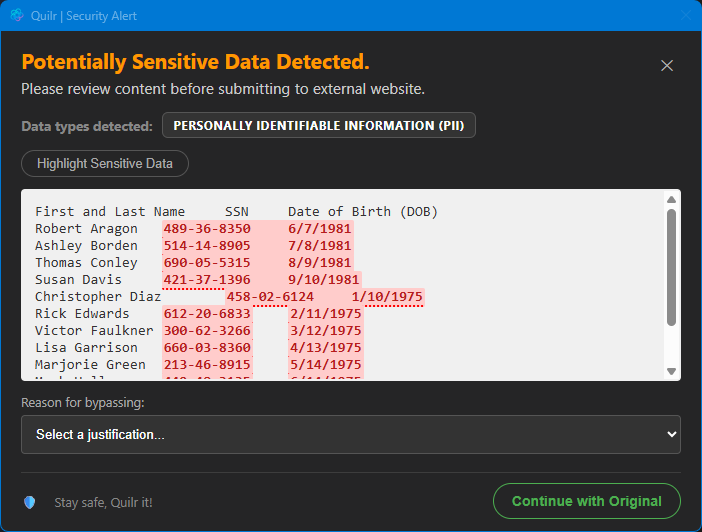
bypass_reason — useful for audit. The BE popup is more lenient (free-form override); EA is stricter by design because the OS-level interception is harder to bypass than a browser tab.4 — Confirm a Finding was generated in the Console
Open Findings, switch to the Endpoint Agent Findings tab, and filter by the test user. A new finding should land within ~2 seconds with:
| Field | Healthy value | If it’s wrong … |
|---|---|---|
| Source | endpoint agent (not browser extension) | Wrong source → the BE caught it first; close the AI site in the browser and retry on the desktop app. |
| App | The native app you used (e.g. Claude Desktop, Cursor, GitHub Copilot) | Listed as unknown → the app isn’t in Detection configurations, or DESKTOP APP MONITORED is off. |
| Event | Prompt (or File Upload if the app supports attaching files) | Different event → the agent classified it as a different category. |
| bypass_reason | Empty if the user closed the popup; the justification string if they clicked Continue with Original | — |
| Device Name | The pilot device hostname (matches the row in Deployment Status) | Different hostname → a different device fired this; isolate. |
| If the popup didn’t fire | Where to look |
|---|---|
Console shows DESKTOP APP MONITORED on this app but GUARDRAILS are off | Toggle on, wait 90 s, retry. |
Console shows NO DESKTOP APP MONITORING for this app | Pick a different app from the list (the screenshot in step 1 shows which qualify), or have Quilr support enable desktop-app monitoring for the requested app. |
| Popup appears in a browser but not in the desktop app | The Browser Extension intercepted first. Close the AI site in every browser tab during the desktop-app test, OR uninstall the BE to isolate the EA path. |
No popup anywhere; agent logs show TLS handshake failed against the AI host | The Quilr CA isn’t trusted by the desktop app’s embedded TLS stack (some Electron apps ship their own root store). See Step 6 § TLS handshake failure. |
| Popup fires but no Finding in Console | Tail proxy.log for Forward failed — the local intercept worked but the upload to the backplane choked. See Step 6 § Forward failed. |
matched … claude.ai event observed · padlock shows the Quilr
CA. The device is fully protected. For fleet rollout, continue to Step 5.